
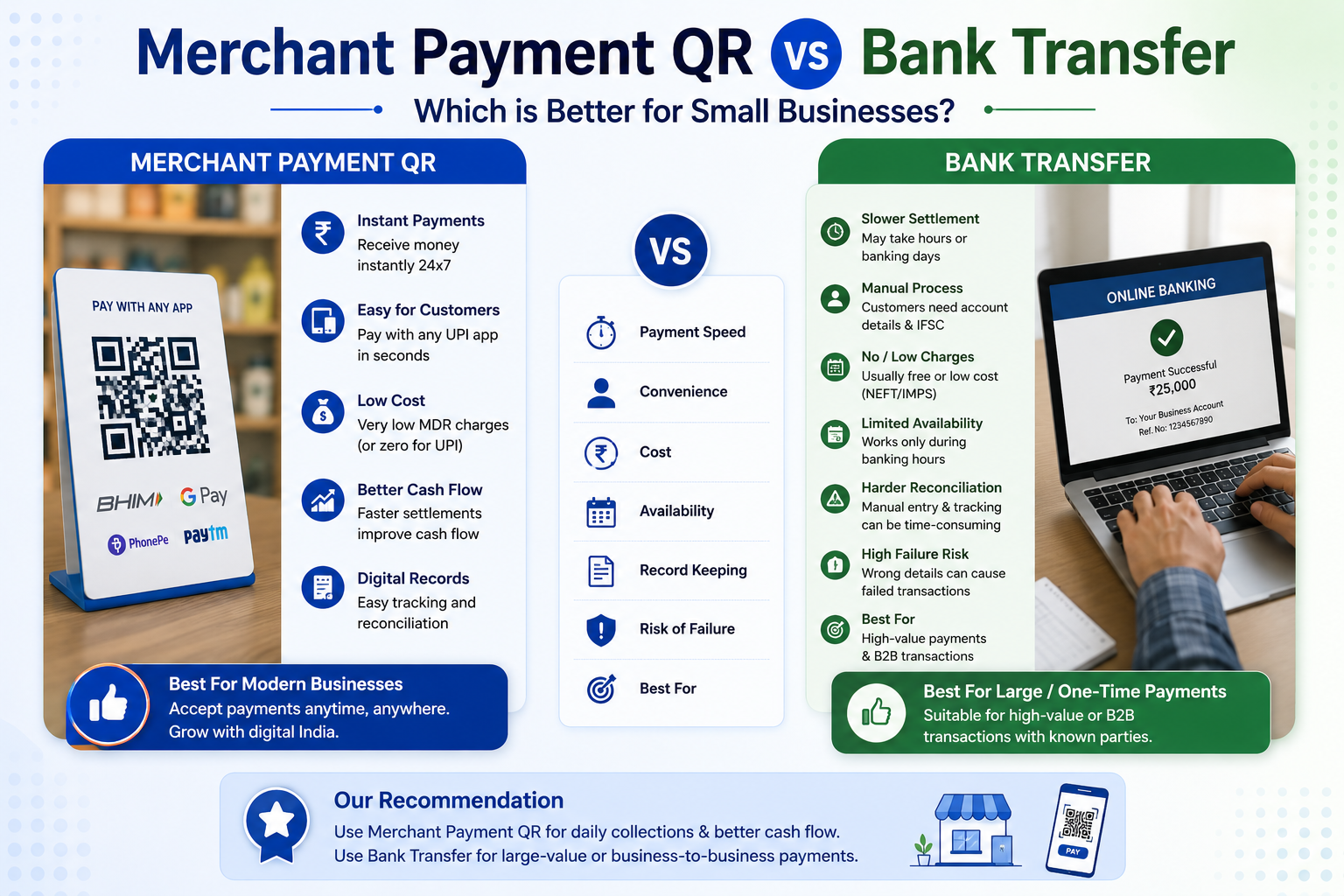
In today’s digital economy, small Indian businesses are increasingly turning to technology to streamline customer payments, leveraging systems like Merchant Payment QR codes and bank transfers. Bajaj Pay, a BBPS-enabled platform available on the Bajaj Finserv App and website, has emerged as a convenient solution for these payment options. Bajaj Pay allows users to make payments effortlessly with zero fees and zero convenience charges, making it ideal for small businesses managing regular transactions. But when it comes to Merchant Payment QR vs. Bank Transfer, which is better suited for your business? Let’s explore the options to help you decide.
What is Merchant Payment QR vs Bank Transfer, and How Does Bajaj Pay Make It Easier?
To understand the Merchant Payment QR and bank transfer comparison, it’s essential to first define what a merchant is. A merchant refers to an individual or business entity that sells goods or services. The term today encompasses everyone from shop owners to e-commerce businesses.
Read More: 3 BHK in Patel Nagar New Delhi and the Future of Well Connected Family Homes
Merchant Payment QR codes are scannable codes linked to a merchant’s bank account, facilitating instant payments from customers through digital platforms like UPI. It’s a hassle-free method that makes it easier for merchants to accept money without the need for physical cash or card swipes. Bank transfers, on the other hand, have been a traditional option for money transactions, where funds are transferred electronically between accounts.
Bajaj Pay simplifies both Merchant Payment QR and bank transfer options by offering customers and merchants a robust BBPS-enabled infrastructure. You can access Bajaj Pay via the Bajaj Finserv App or website, and enjoy secure transactions free of any fees or hidden convenience charges. The platform supports seamless, instant payments through various modes, ensuring money transfers and QR payments are easier than ever for small businesses in India.
Features of Merchant Payment QR Codes and Bank Transfers on Bajaj Pay
- BBPS-certified and RBI-regulated secure payment platform: Bajaj Pay operates under stringent regulations to ensure the highest level of security for all transactions.
- Zero fees and charges: Users can make payments without incurring extra convenience fees or hidden costs.
- Accessible across devices: Small businesses can use Bajaj Pay on the Bajaj Finserv App or directly via the website.
- Multi-payment modes available: Bajaj Pay supports payments through UPI, net banking, debit cards, and credit cards.
- Instant confirmation: Every transaction generates an immediate confirmation along with a downloadable digital receipt.
- Expansive network coverage: Bajaj Pay connects merchants and customers to various billers, banks, and service providers, ensuring unmatched flexibility for payments.
- Auto-pay option: Perfect for small businesses with recurring bills, allowing them to avoid missed payments.
- 24×7 availability: The platform ensures uninterrupted access to manage all types of payments.
Top 5 Providers for Merchant Payment Solutions on Bajaj Pay
1. Google Pay
- Category: UPI payment solution using Merchant QR codes.
- Coverage: Pan-India.
- Features: Instant payment processing; integrates seamlessly with Bajaj Pay’s BBPS infrastructure.
2. PhonePe
- Category: Digital wallet and UPI-based payments.
- Coverage: Nationwide operations, widely preferred by small businesses.
- Features: Offers recurring payment tracking and integration with Merchant QR codes.
3. Paytm
- Category: QR-based UPI payment solution.
- Coverage: Widely adopted across cities and rural areas in India.
- Features: QR-based payments accepted by over 21 million merchants and integrated with Bajaj Pay for zero-fee transactions.
4. BHIM UPI
- Category: Government-enabled UPI payments using Merchant QR codes.
- Coverage: Pan-India network with strong penetration in urban and semi-urban areas.
- Features: Supports instant money transfer with secure encryption protocols.
5. Amazon Pay
- Category: Digital wallet and payment platform.
- Coverage: Connected to multiple merchants and e-commerce players across India.
- Features: Makes payments quick, easy, and adds customer trust while working with Bajaj Pay functionality.
Things to Keep in Mind Before Accepting Customer Payments
- Choose the right payment mode: Evaluate Merchant Payment QR or bank transfers based on your business transaction frequency and customer preference.
- Verify details: Double-check QR codes, customer payment credentials, or account numbers before confirming any transaction.
- Maintain payment timelines: Keep track of your transaction deadlines to ensure smooth payment operations, preventing payment delays or penalties.
- Enable auto-pay: If you have recurring payments, set up auto-pay options via the Bajaj Finserv App to streamline finances.
- Check rewards and offers: Bajaj Pay lets users earn rewards on eligible transactions, so ensure you explore available cashback deals before confirming payments.
- Preserve transaction records: Save digital receipts as proof of payment completion, particularly for higher-value transactions.
- Reliable connectivity: Use a strong, stable internet connection to prevent transaction interruptions or errors.
Benefits of Paying Through Bajaj Pay
1. Zero Fees and Charges
Bajaj Pay doesn’t impose any convenience fees or hidden charges, making it a cost-effective solution for small Indian businesses managing customer payments.
2. Rewards and Offers
Users can enjoy exclusive cashback, discounts, and loyalty rewards through Bajaj Pay when processing transactions for bills or recharges.
3. Secure and Trusted Platform
Bajaj Pay is a BBPS-certified platform regulated by RBI and incorporates end-to-end encryption to safeguard all transactional data.
4. One-Stop Solution for Payments
Bajaj Pay’s app and website allow businesses to handle bill payments, recharges, FASTag, money transfers, and more all in one place, eliminating hassles.
5. Instant Confirmation and Digital Receipts
Once a payment is completed, real-time confirmation along with easily downloadable receipts ensures transparency.
6. Multiple Payment Modes
Bajaj Pay caters to diverse needs with options such as UPI, net banking, debit card, credit card, and digital wallets.
7. 24/7 Availability
Regardless of the time, Bajaj Pay ensures uninterrupted access to payments so businesses can operate without delays.
How to Use Bajaj Pay to Accept Customer Payments
Step 1
Open the Bajaj Finserv App on your smartphone or visit the Bajaj Pay website using your browser.
Step 2
Log in with your registered mobile number or create a new account if you’re using Bajaj Pay for the first time.
Step 3
Navigate to the ‘Payments’ section from the home screen and choose between Merchant Payment QR or Bank Transfer options.
Step 4
For Merchant QR transactions, select a QR-enabled payment mode like UPI. If choosing bank transfer, select the recipient bank account and provide necessary details.
Step 5
Enter the required details, such as your QR code, customer ID, mobile number, or bank transfer information.
Step 6
Verify the payment amount and select your preferred payment mode like UPI, debit card, credit card, or net banking.
Step 7
Confirm the transaction, and ensure you save or share the digital receipt generated for your records.
Conclusion
Both Merchant Payment QR codes and bank transfers offer effective ways for small Indian businesses to accept customer money. While QR payments are quick, convenient, and customer-friendly, bank transfers provide security for larger transactions. Bajaj Pay, a BBPS-enabled platform accessible on the Bajaj Finserv App or website, ensures ease of operation for both methods by offering zero fees, robust security, and instant payment confirmations. Choose the option that best suits your business’s needs, and experience the added convenience, rewards, and reliability that come with using Bajaj Pay. To get started, download the Bajaj Finserv App or visit the Bajaj Pay website today!
Read More: Charles Spinelli Highlights Employee Benefits as a Tool for Workforce Retention